Router Rebellion: The Americans Who Stopped Trusting Factory Firmware
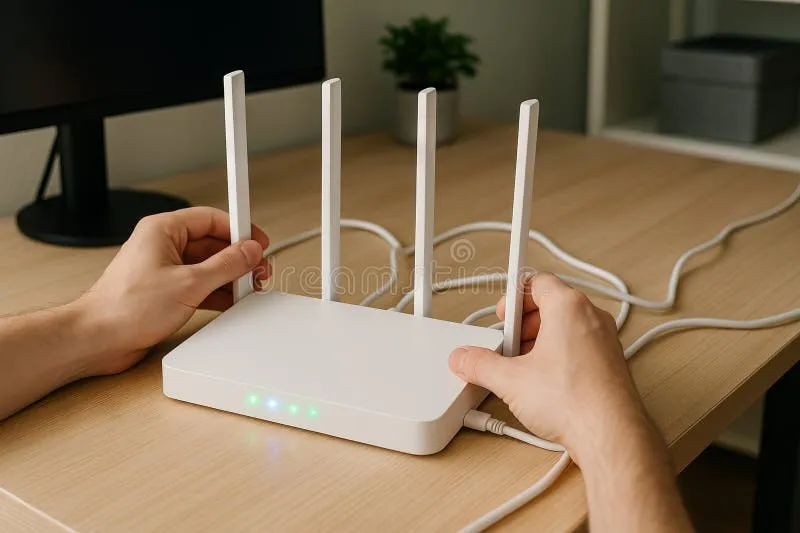
Photo: person configuring wireless router network settings home office, via thumbs.dreamstime.com
There's a little plastic box sitting in your living room right now that controls every byte of data moving in and out of your home. Your router. And there's a good chance the software running on it was written by a manufacturer you've never thought twice about, hasn't been updated in two years, and is quietly doing things you never agreed to.
A growing number of Americans have decided that's not good enough. They're flashing their own firmware — replacing the factory-installed code with open-source alternatives — and in doing so, they're taking back one of the most fundamental pieces of their digital lives.
What's Actually Wrong With Your Stock Firmware?
Here's the thing manufacturers don't put in the box: your router is basically a tiny computer running a full operating system, and the software that ships on it is often a mess. Security patches lag by months. Features get locked behind arbitrary limitations. And in some cases, the firmware is actively phoning home — sending telemetry data back to corporate servers without any meaningful disclosure in that 47-page EULA you definitely read.
Researchers at American University and various independent security labs have repeatedly found that popular consumer routers ship with outdated Linux kernels, hardcoded credentials, and unpatched vulnerabilities that sit exposed for years. In 2022, the FTC called out router manufacturers directly over their failure to provide timely security updates. The situation hasn't dramatically improved since.
Beyond security, there's the feature problem. Manufacturers artificially cripple firmware to push you toward more expensive models. Want QoS controls? Buy the premium version. VPN client support? Upgrade. It's the same vendor lock-in playbook, just running on your home network equipment.
Enter the Open-Source Alternative
The firmware flashing movement has been around for decades — OpenWrt traces its roots back to 2004 — but it's genuinely hitting a wider audience now. Projects like OpenWrt, DD-WRT, and Tomato give you a fully open, actively maintained, community-audited operating system for your router hardware.
OpenWrt, arguably the gold standard, runs on hundreds of router models and gives you a package manager — yes, like apt or pacman, for your router — that lets you install software like AdGuard Home, WireGuard VPN, traffic monitoring tools, and more. You're not just replacing bad firmware with slightly less bad firmware. You're getting a platform.
DD-WRT is another popular option, especially for users who want a more traditional interface without diving deep into command-line territory. It supports a massive range of hardware and has been around long enough that the community knowledge base is enormous.
Who's Actually Doing This?
The stereotype of the firmware flasher is some guy in a basement with a soldering iron and three monitors. Reality is considerably more boring — and more encouraging.
Take Marcus, a high school teacher in suburban Ohio who flashed his Netgear router with OpenWrt after his ISP's DNS started redirecting his failed queries to an ad-laden search page. "I didn't know anything about networking when I started," he says. "I watched a couple of YouTube videos, followed the OpenWrt wiki, and had it running in about an hour. The hardest part was backing up my old settings."
Or consider the small businesses quietly adopting this approach. A marketing agency in Austin runs OpenWrt across four locations because it lets their IT contractor manage everything remotely through WireGuard tunnels — a setup that would cost significantly more through commercial alternatives like Meraki.
Busting the Myths That Keep People Locked In
"I'll brick my router." This one has some historical truth, but modern flashing procedures on supported hardware are remarkably safe. The OpenWrt wiki is genuinely one of the best pieces of technical documentation on the internet. If your router is on the supported list and you follow the instructions, the risk is low. Most "bricks" are actually soft-bricks that can be recovered through a 30/30/30 reset or TFTP recovery.
"It'll void my warranty." Probably, yes. Your router that costs $60 and would have been replaced in three years anyway. Weigh that against years of meaningful control over your home network.
"It's too complicated for me." This is the one the manufacturers most want you to believe. The OpenWrt LuCI web interface looks remarkably similar to stock router admin panels. You don't need to touch the command line to get most of the major benefits.
"My ISP will freak out." Your ISP manages your connection up to the modem. What runs behind it is your business. Open-source firmware is fully standards-compliant — your ISP can't tell the difference.
Getting Started: A Practical Path Forward
Before you flash anything, check compatibility. OpenWrt maintains a device table at openwrt.org/toh that tells you exactly which hardware is supported and what the install process looks like. If your current router isn't on the list, this is a great excuse to pick up a supported device — Linksys WRT series routers, certain TP-Link models, and the Netgear R7800 are community favorites.
Once you've confirmed compatibility, the process typically goes:
- Download the correct firmware image — not just any OpenWrt build, but the one specific to your hardware revision. Hardware revisions matter.
- Back up your current settings — screenshot everything, or use your router's export function.
- Flash via the stock admin panel — most routers let you upload new firmware through the regular interface. No special tools required.
- Configure from scratch — your old settings won't transfer, but you'll want to set things up properly anyway.
After that, the rabbit hole goes as deep as you want. Block ads network-wide with AdGuard Home. Set up a WireGuard server so you can access your home network from anywhere. Run per-device bandwidth monitoring. Create isolated guest VLANs. The platform is yours.
Why This Matters Beyond Your Living Room
This isn't just about getting better router features. It's about a broader principle that HypeOS has always stood behind: the infrastructure of your digital life shouldn't be controlled by companies whose interests are fundamentally misaligned with yours.
When you flash open-source firmware, you're getting security updates that the community ships within days of vulnerability disclosure, not months. You're getting full transparency — you can read every line of code if you want to. And you're sending a signal, however small, that users aren't content to be passive consumers of whatever the manufacturer decided to ship.
The router is the gateway to everything. It's worth five minutes of research to make sure it's actually on your side.